
Public reports
With edalitics you can define 4 levels of visibility for your reports:
- Private: Only you see them.
- Shared: You share them with the groups you want.
- Common: They are accessible to any user who has logged in to the application.
- Public: They are publicly accessible from the internet.
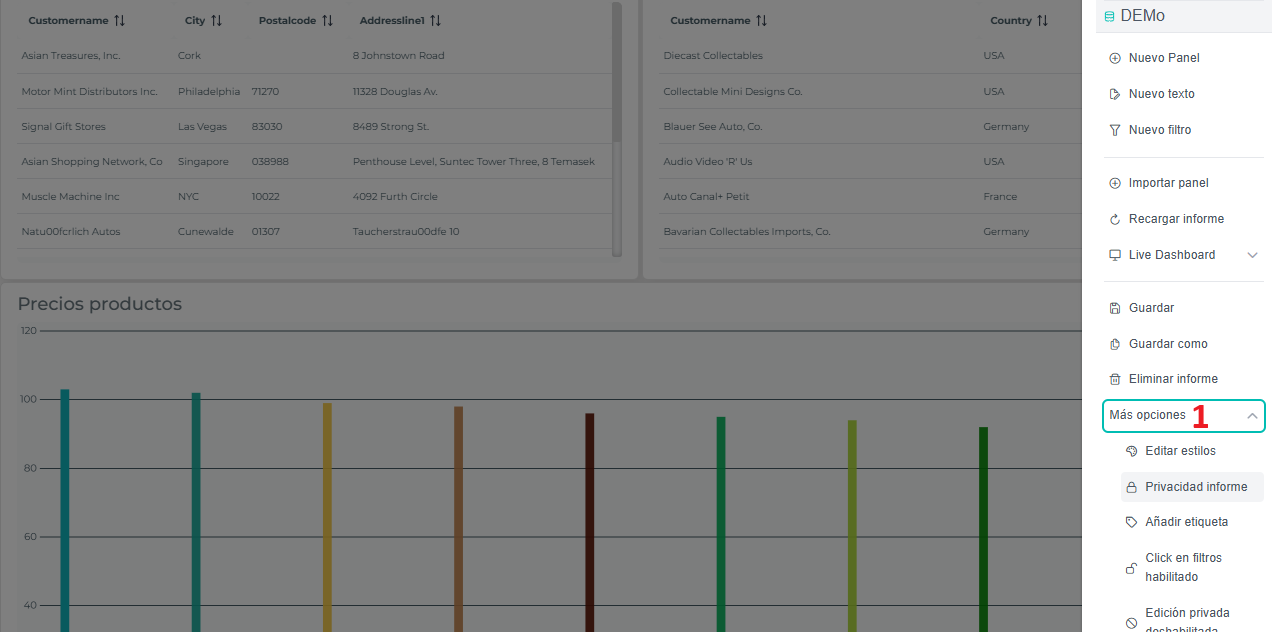
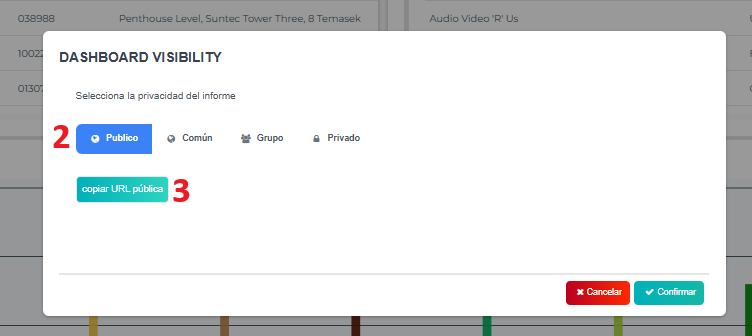
Public reports are publicly accessible from the internet. edalitics will provide you a sharing URL. First of all, you must go to privacy report (1). To create a public report you must mark it as public (2). Once the report is public, you can get the sharing url (3) that you can share with anyone or embed it on your website.
Besides, if you want to limit user interaction even more by making them only see your report but not be able to interact with it, you can hide the control wheel by adding the parameter ?hideWheel=true such as: https://free.edalitics.com/es/#/dashboard/691ed226f970360af1143295?hideWheel=true
Finally, if you want to publish only the panels of a report, you can add the option panelMode=true . This way you can publish only the panels. You can even interact with them by providing the filters through the url. For example: https://free.edalitics.com/es/#/dashboard/691ed226f970360af1143295?panelMode=true