

Data model
Edalitics allows creating a logical data model from which users can create reports in a simple and intuitive way. An administrator user can generate data models. To generate a data model, an administrator user must configure a database connection and give it a name:
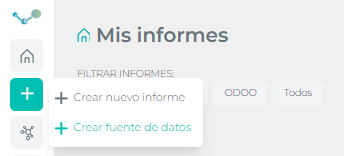
Once the connection data is provided, EDA will generate a logical model automatically. Generating:
- Entities from the tables and attributes from the columns.
- Relations between the different tables from columns with the same name and id format ( fields that contain id_, or fk_, or code, or nk_ )
- If we mark the option “Optimize Queries” we will also have statistics on the size of the tables that will be used to advise the user when making reports. Preventing unnecessary heavy queries.
Generating a logical model enriched with names and descriptions that will allow the business user to perfectly understand the content of the data model.
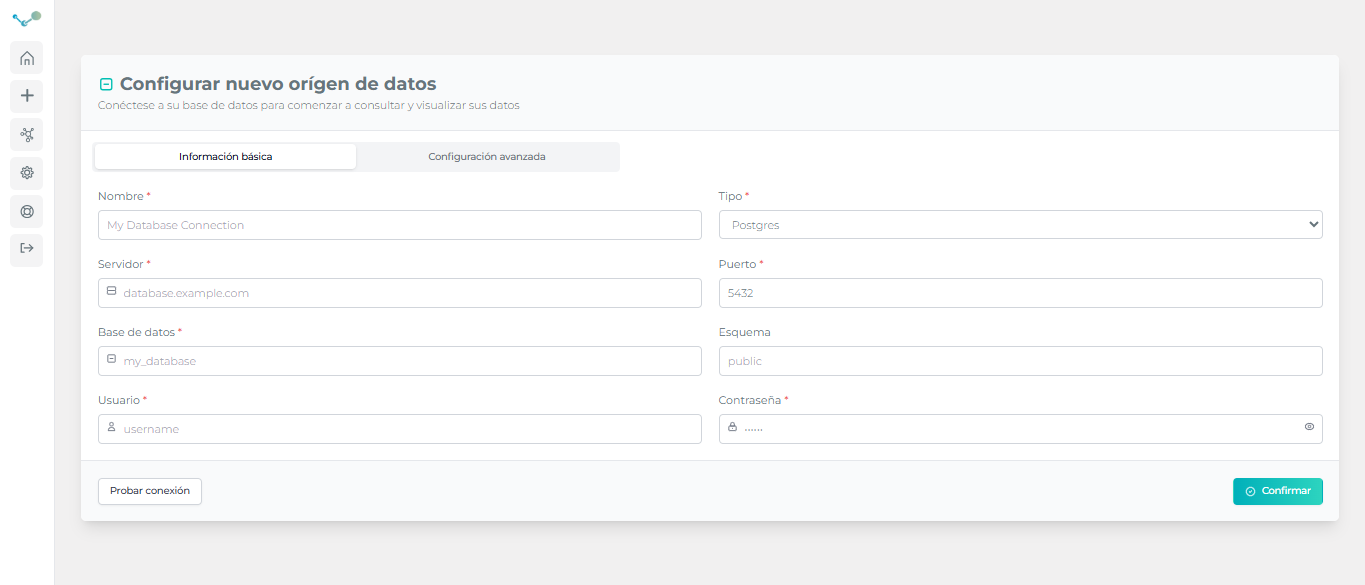
To generate a data model it is only necessary to have the connection data to the database:
- Connection name
- Connection type (MySql, PostgreSQL, Oracle, SqlServer, Snowflake, Vertica, etc)
- Server
- Database name
- Schema (if applicable)
- User
- Password
- Filter: Allows you to specify the tables that you want to include in the model by concatenating the elements table_a, table_b, table_c or using sql patterns eda_%
Data models can be enriched with:
- Views at the model level: Being able to define views at the logical model level that behave like new tables. This is especially recommended when you have complex queries that are used repeatedly. A view can be defined at the logical model level. How to add a view
- Generation of entities from a csv: Designed for dynamic environments. A new entity can be generated in the model from a csv of data. This functionality loads the csv data into a database table. This functionality is enabled only with models defined with Postgresql.How to upload a csv
- Calculated fields: You can add a calculated field to a table that allows you to perform operations. If you want to generate a numerical field, you must include the aggregation you want to do. How to add a calculated field Also you can watch the video: https://youtu.be/UT9d6EOpLO0
- Maps: Geojson files can be uploaded and linked to one (or several attributes) so that layer maps linked to those attributes can be generated.
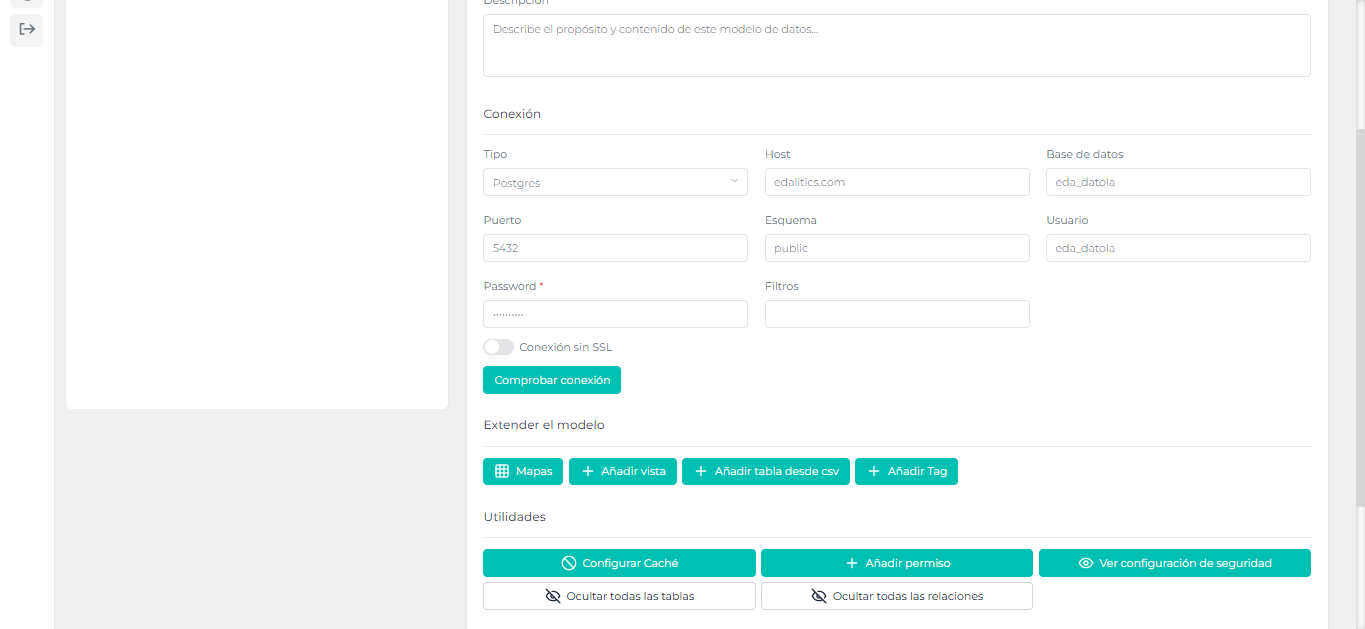
Data models can be secured at the data level, allowing you to define security at the record level. Security is applied to the session user.
Data models determine whether queries against that model will cache data and how long that cache will be in effect.
Video tutorial
Section titled “Video tutorial”Customize the model
Section titled “Customize the model”edalitics generates the data model automatically. But this is just a help. The data model can be customized:
- Hiding tables
- Hiding technical columns that do not have to appear in the model
- Changing the names of tables or columns
- Generating meaningful descriptions
- Creating or deleting relationships between tables
- Adding calculated columns How to add a calculated field
- Define lists of Possible Values
EDA’s data model
Section titled “EDA’s data model”Below is an edalitics data model
{    "_id": "XXXX", // Model's id    "ds": {        "connection": {            "database": "mydb", //  Database name            "host": "127.0.0.1", // Database server            "password": "xxxx", // Database password            "poolLimit": 10, // In case you want to activate pool the number of concurrent connections (only with mysql)            "port": 3306,            "schema": "",            "searchPath": "",            "sid": 1,            "type": "mysql",// Database type. Possible values: 'postgres', 'mysql', 'vertica', 'sqlserver', 'oracle', 'bigquery', 'snowflake', 'jsonwebservice'            "user": "myuser",            "warehouse": "" // For Snowflake        },        "metadata": {            "cache_config": {  // Cache configuration                "enabled": false,                "hours": "06",                "minutes": "00",                "quantity": 1,                "units": "days"            },            "filter": "",            "model_granted_roles": [ // Security configuration                {                    "column": "fullModel",                    "global": true,                    "none": false,                    "permission": true,                    "table": "fullModel",                    "type": "anyoneCanSee",                    "users": [                        "(~ => All)"                    ],                    "usersName": [                        "(~ => All)"                    ]                }            ],            "model_id": "",            "model_name": "edalitics MODEL",            "optimized": false,            "external" : {}        },
        "model": {            "maps": [ ],  // Maps Configuration            "tables": [  // Tables list                {                    "table_name": "table_a", // Database's table name                    "table_type": [],                    "display_name": {                        "default": "Table A Description",   // Name of the table that the user will see                        "localized": [ ]                    },                    "description": {                        "default": "Table A description ",  // Description of the table that the user will see                        "localized": [ ]                    },
                    "tableCount": 0, // Number of records in the table. It is used for optimizations.                    "visible": true, // Determines whether the table is visible to the user or has a technical function                    "columns": [ // List of table columns                        {                            "aggregation_type": [  // Possible column aggregations                                {                                    "display_name": "Cuenta Valores",  // Name that the user will see                                    "value": "count"      // Aggregation type                                },                                {                                    "display_name": "Valores Distintos",                                    "value": "count_distinct"                                },                                {                                    "display_name": "No",                                    "value": "none"                                }                            ],                            "column_granted_roles": [ ],                            "column_name": "id", // Table column name                            "column_type": "numeric", // Column type. Possible values are numeric, text, date, coordinate                            "display_name": {                                "default": "Columna con el id", // Name of the column that the user will see                                "localized": [                                ]                            },                            "description": {                                "default": "Columna con el id de la tabla ",// Description of the column that the user will see                                "localized": [                                ]                            },                            "minimumFractionDigits": 0, // Number of decimal places the user will see on the front-end                            "row_granted_roles": [ ],                            "tableCount": 0,                            "valueListSource": {  // In case the column is an id pointing to a value list                            },                            "visible": true  // Determines whether the user sees the column (true) or whether it is hidden or hidden (false)                        }                    ],                    "no_relations": [],                    "relations": [  // Table relationships. What other tables is it related to and how?                        {                            "display_name": {                                "default": "Relation Name", // Name to display for the relationship                                "localized": [ ]                            },                            "source_column": [  // Origin column(s)                                "id"                            ],                            "source_table": "table_a", // Source table                            "target_column": [ // Destination column(s)                                "id"                            ],                            "target_table": "table_b",  // Destination table                            "visible": true  // Whether it is visible, active or not.                        }                    ]
                },
                {                    "table_name": "table_b",                    "table_type": [],                    "description": {                        "default": "Table B Name",                        "localized": [ ]                    },                    "display_name": {                        "default": "Table B Description",                        "localized": [ ]                    },                    "tableCount": 0,                    "visible": true,                    "columns": [                        {                            "aggregation_type": [                                {                                    "display_name": "Cuenta Valores",                                    "value": "count"                                },                                {                                    "display_name": "Valores Distintos",                                    "value": "count_distinct"                                },                                {                                    "display_name": "No",                                    "value": "none"                                }                            ],                            "column_granted_roles": [                            ],                            "column_name": "id",                            "column_type": "numeric",                            "description": {                                "default": "ID",                                "localized": [                                ]                            },                            "display_name": {                                "default": "ID",                                "localized": [                                ]                            },                            "hidden": 0,                            "minimumFractionDigits": 0,                            "row_granted_roles": [                            ],                            "tableCount": 0,                            "valueListSource": {                            },                            "visible": true                        }                    ],                    "no_relations": [],                    "relations": [                        {                            "bridge": false,                            "display_name": {                                "default": "Relation Name",                                "localized": [ ]                            },                            "source_column": [                                "id"                            ],                            "source_table": "table_b",                            "target_column": [                                "id"                            ],                            "target_table": "table_a",                            "visible": true                        }                    ]
                }            ]        }    }}